
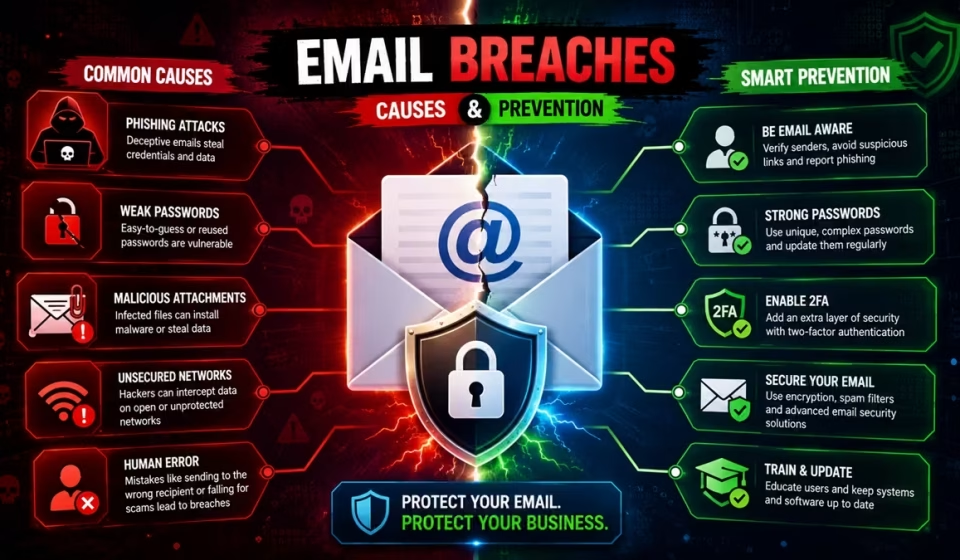

Have you ever wondered why your email inbox can suddenly feel like a hacker’s playground? How can it be by just one click on a link that seems harmless can turn your personal data into a headline? In this post, we’ll take a closer look at the most common causes of email breaches to explain why they’re important and provide you with actionable steps, including a handy table helping to keep your inbox and identity secure.
Why Email Breaches Matter
Email has become the backbone of communication in our modern lives. Whether you’re a freelancer, a small business owner or part of a large corporation, you rely on email to handle sensitive information, contracts and financial details. When a breach occurs, the consequences can be quite costly.
• Data theft
Personal IDs, passwords, credit card numbers, or confidential trade secrets can be compromised.
• Financial loss
Fraudulent transactions, ransom demands or regulatory fines.
• Reputation damage
Customers often lose their trust when they are notified of a security breach.
• Legal liability
You may be required by local privacy laws to notify those who are affected.
Understanding the root causes of email breaches is crucial for our defense strategy. So, let’s get started.
Common Causes of Email Breaches
| S/N | Cause | How It Works | Typical Risk Level |
|---|---|---|---|
| 1 | Weak or Reused Passwords | Attackers use credential stuffing tools to try leaked username / password combos across many sites. If your email password is weak or reused, it’s a matter of time before they get in | High |
| 2 | Phishing & Social Engineering | Fraudulent emails can easily impersonate trusted contacts by urging you to click on a malicious link or to enter your credentials on a deceptive login page | High |
| 3 | Malware / Ransomware | Infected links and malicious attachments can deploy software that not only captures your keystrokes, but also encrypts your mailbox or spreads throughout the network | High |
| 4 | Unsecured Wi Fi Networks | If you’re using public Wi-Fi without encryption, eavesdroppers can easily capture any unencrypted email traffic you send | Medium |
| 5 | Insider Threats | Disgruntled employees or careless contractors can misuse their access privileges to copy, forward or even delete important messages | Medium |
| 6 | Third Party Application Vulnerabilities | When your email is connected to calendar integrations, CRM tools or cloud storage apps, there’s a chance they could be compromised and giving the attackers a backdoor to access your information | Medium |
| 7 | Out of Date Email Client or Server | Unpatched software might have security flaws that attackers are ready to exploit | Medium to High |
| 8 | Lack of Email Encryption | Messages sent in plain text can be intercepted and read by anyone on the network path | Low to Medium |
Quick tip:
The table above provides a snapshot of how many breaches are caused by a combination of these factors. For example, a weak password and an unpatched client can create a perfect storm for security breaches.
Weak or Reused Passwords
Are you still relying on Password123! or using the same password for your Gmail, bank, and shopping sites? If so, you’re making it way too easy for cybercriminals. Credential-stuffing attacks take leaked credentials from one breach and throw them at every other online sites. Did you know that the average person reuses a password for at least five accounts? That really increases the risk of being targeted and the chances of getting hacked.
Phishing & Social Engineering
It’s alarming how phishing emails can mimic real ones. They might come across as a fake invoice from a vendor, a password reset notice from your email provider or an urgent wire transfer request from your boss. These emails typically have a link to a spoofed login page or a malicious attachment, such as a PDF file with embedded macros.
Malware / Ransomware
Did you know that email is the leading delivery method for ransomware? Once a malicious attachment (often a Word doc, Excel file, or ZIP) is opened, the payload can encrypt all your mail, attachments and even files stored on network drives. To make matters worse, some of these ransomware types even steal your contacts to launch further phishing attacks using your account.
Unsecured Wi‑Fi Networks
If you’re checking your email at a coffee shop using open Wi-Fi, be aware that your connection is out in the open for anyone nearby to see. This vulnerability allows attackers to use packet-sniffing tools to capture your login info or the content of any unencrypted emails.
Insider Threats
Keep in mind that breaches don’t always come from external hackers. An employee who has legitimate access might share sensitive client lists with their personal email, or a contractor could unintentionally upload a mailbox to a public cloud folder.
Third‑Party App Vulnerabilities
A wide variety of software application services require read and write access to your email account in order to sync calendars, manage support tickets or integrate with CRM tools. If any of these services are compromised, it allows attackers to access your entire inbox without ever needing to crack your password.
Out‑of‑Date Email Client or Server
Software vendors regularly update their software with patches to fix security issues. Ignoring these updates means you’re leaving known vulnerabilities exposed. A notable example is the Outlook vulnerability (CVE‑2023‑23397) that allowed attackers to steal email credentials without any user action needed.
Lack of Email Encryption
Traditional SMTP doesn’t offer end-to-end encryption for your email messages. If your email provider doesn’t support TLS (transport layer security) or you haven’t set up S/MIME or PGP, then anyone in the path between the sender and receiver can access the content of your emails.
How to Prevent Email Breaches
Now that we’ve identified what can go wrong, let’s dive into how to prevent it. Here are some practical step-by-step measures you can put into action right away, whether you’re a solo freelancer or working within a larger organization.
Use Strong Unique Passwords + Password Manager
• Generate passwords that are a minimum of 16 characters long by incorporating uppercase letters, lowercase letters, numbers, and special symbols. Example using password “R3li@ble*P@ssw0rd#2”.
• Never reuse passwords across multiples online accounts.
• Adopt a reputable password manager (Bitwarden, 1Password or Dashlane) to generate and securely manage your passwords.
Enable Multi‑Factor Authentication (MFA)
Multi-Factor Authentication (MFA) adds an important extra step to keep your accounts safe. This typically involves a second verification step, which could be a one-time code sent to your phone within a specific short time frame, a hardware token (YubiKey) or a biometric check. This means that even if a hacker manages to steal your password in which they still can’t break in without that second verification step.
Pro tip:
When it comes to authentication, I’d suggest going for an authentication app or a hardware token instead of SMS. This is important because due to the risk of SIM-swapping attacks can intercept those SMS text messages.
Learn to Spot Phishing
• Check the sender
Does the domain match the organization (e.g., support@google.com vs support@goog1e.com)?
• Hover over links
Before you click on any links, verify the actual URL. If it appears to be suspicious, do not click on it.
• Be wary of urgency
Be cautious of phrases such as ‘Immediate action required’ or ‘Your account will be suspended’ as they serve as red flags.
• Verify attachments
If you did not anticipate receiving a file, verify with the sender through an alternative communication method.
Keep Software Up‑to‑Date
• It is essential to configure the operating system, email client, browser and other softwares for automatic updates on both desktop and mobile devices.
• In business settings, it is advisable to implement a patch-management solution that organizes updates for all devices.
Use Encrypted Email
• TLS/SSL encrypts email in transit between mail servers, but it does not offer protection for the message once it reaches the recipient’s server.
• S/MIME (Secure/Multipurpose Internet Mail Extensions) and PGP (Pretty Good Privacy) deliver end-to-end encryption, which guarantees that only the intended recipient is able to read the message.
• A variety of modern secure email services, including ProtonMail and Tutanota offer integrated encryption that can be easily activated.
Secure Your Network
• Avoid public Wi‑Fi for email unless you’re using a reputable VPN (Virtual Private Network).
• Ensure that the VPN types (IPsec, OpenVPN or WireGuard) that uses strong encryption and tunneling protocols to protect data in transit while on a public network.
• At home, it is advisable to implement Wi-Fi Protected Access 3 (WPA3) or at the very least with WPA2 for your Wi-Fi network. Do not forget to change the default password of your router as well.
Limit Access & Apply Least Privilege
• Give employees or contractors only the minimum permissions they need to perform their job.
• Regularly audit who has access to shared mailboxes and forward rules.
• Use role‑based access controls (RBAC) in your email platform.
Conduct Regular Security Awareness Training
• Conduct simulated phishing campaigns to evaluate your team’s preparedness.
• Facilitate quick and interactive learning sessions (5-10 minutes) that cover the latest email threats.
• Recognize and reward employees who report suspicious emails.
Monitor & Respond Quickly
• Set up alert rules for unusual login locations, multiple failed password attempts or large‑scale exports of mailbox data.
• Utilize SIEM (Security Information and Event Management) tools to analyze and interpret events across your network.
• Establish an incident response plan that details the procedures for containment, investigation and notification.
Quick‑Reference Table: Causes vs. Prevention
Here’s a handy table that links each major cause to its corresponding primary prevention measure. It’s ideal for sticking on your office wall or keeping as a quick reference checklist.
| Cause | Primary Prevention |
|---|---|
| Weak or reused passwords | Use a password manager + MFA |
| Phishing & social engineering | User training + email filtering |
| Malware / ransomware | Attachments scanning + endpoint protection |
| Unsecured Wi Fi | VPN + WPA3 |
| Insider threats | Least privilege access + activity logging |
| Third party application vulnerabilities | Review app permissions + vendor security assessments |
| Out of date software | Auto update / patch management |
| Lack of encryption | Enable TLS + end to end encryption (S/MIME / PGP) |
Best Practices for Businesses
Running a company comes with its own set of extra responsibilities. Here are some advancement strategies you might want to consider.
These might catch your interest too...

• Email Gateway / Sandbox
Deploy an email security gateway that sandboxes attachments and scans URLs in real time.
• Data Loss Prevention (DLP)
Configure rules that block or warn when sensitive data (Eg, company confidential information or personal confidential data) is sent outside the organization.
• Mailbox Auditing
Implement mailbox audit logging to keep track of folder access, particularly for shared or privileged accounts.
• Zero‑Trust Architecture
Assume that any device or user could potentially be compromised. It is essential to verify continuously rather than depending on just one login.
• Regular Security Audits
Perform penetration tests and vulnerability scans at least once a year.
What to Do If You’re Already Breached
Even the most robust defenses can’t guarantee that breaches won’t happen. The real focus should be on how quickly you can respond and contain the problem.
• Disconnect Affected Accounts
Temporarily disable the compromised email account or change its password immediately.
• Assess the Scope
We need to identify what data was accessed. Was it related to customer information, internal documents or perhaps financial records?
• Notify Stakeholders
Depending on the applicable local regulations, you may be required to let customers, partners and government authority know within a specific time period.
• Eradicate the Threat
Conduct comprehensive malware scans, re-image devices and revoke any compromised API keys or tokens.
• Recover Data
Before restoring from clean backups, verify that the backup is not infected or compromised.
• Post‑Mortem
Perform a comprehensive assessment. How did the intruder gain access? What areas can be enhanced? Revise policies and training as needed.
Conclusion
Email breaches pose a serious and ever-changing risk, but they’re not something we have to accept. By learning about the factors that contribute to these breaches (such as weak passwords and unpatched software), you can take practical steps to safeguard yourself and your organization.
Remember:
• Strong unique passwords and multi‑factor authentication are your first line of defense.
• Recognizing phishing and identifying suspicious attachments through education is your most reliable early-warning system.
• Encryption, network security and regular updates help to keep the cybercriminals at bay.
Put the checklist into practice, go through the table and make email security a regular part of your routine instead of just a one-time effort. What is your opinion on this?
Frequently Asked Questions (FAQs)
What is the most common reason email accounts get hacked?
One of the biggest threats out there is phishing. This is when attackers cleverly deceive you into clicking on a harmful link or sharing your password. Many people have a habit of reusing the same password across various sites. If one of those sites gets hacked, hackers will waste no time trying using the same login details on your email account.
How do I know if someone has unauthorized access to my email?
Be on the lookout for anything unusual in your sent folder through emails you don’t recall writing or password reset requests for accounts you didn’t initiate. Also, take a moment to check your account’s login activity logs for any devices or locations that don’t look familiar.
How does phishing work in email attacks?
Phishing is a deceptive social engineering attack where the attacker poses as a trusted contact or company trying to coax you into revealing your password or clicking on a harmful link. These emails often use urgent phrases just like “Your account will be closed” to pressure you into making a quick decision.
The link might take you to a fake login page designed to steal your credentials or it could even download malware onto your device. Since the email looks like it’s from someone you know, it’s all too easy to get caught off guard.
Is having a strong unique password good enough to stay safe?
Starting with a strong password is a great first step, but it’s often not enough by itself. If you’re using the same password on multiple sites, a breach on one site could give hackers the opportunity to try that password on your email account. Even a password that’s moderately strong can be compromised if it’s reused on another service that experiences a breach. To greatly reduce your risk, it’s best to use unique complex passwords for each of your accounts.
Hackers have access to some sophisticated tools that can crack passwords or even buy them from data breaches. That’s why it’s crucial to use a password manager to keep track of your complex passwords and to avoid using the same one more than once.
Could my email be breached if I use public Wi-Fi?
Absolutely. When you’re on public Wi-Fi at coffee shops or airports, the connection is typically unencrypted which can allow hackers on the same network to intercept your data. To keep your information safe, always connect through a trustworthy VPN. This will help to create a secure tunnel for your data making it impossible for anyone else to read it even when they intercept your data.
What should I do immediately if I suspect my email has been breached?
Should you suspect a breach, it’s crucial to take immediate action. Start by changing your password to a strong unique one and logging out of all active sessions on every device. If multi-factor authentication (MFA) has not been set up, try to enable it for extra protection.
Take a moment to review your account recovery details through your phone numbers or alternate email addresses to confirm that a hacker hasn’t altered them. Finally, reach out to your IT department so they can dig into the situation and assess the extent of the unauthorized access.
What is the human element in email security?
Security experts often highlight that the human factor is the weakest link, since technology can only do so much to mitigate human error. Taking a moment to pause, check the sender’s address and think carefully before clicking on links is your best defense. Keeping yourself updated on current scam tactics is essential for safeguarding both yourself and your data.